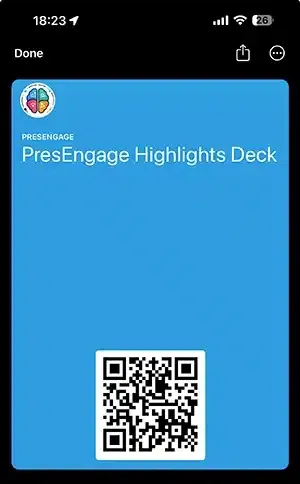
The most useful thing you can hand an attendee is not a flyer, a swag bag, or a business card — it is a single tap that drops your entire session into the phone they never put down. That is what an Apple Wallet or Google Wallet pass does. Instead of hoping someone screenshots a QR code before you change slides, you give them a pass that lives next to their boarding passes and concert tickets, ready to reopen your Q&A, your slides, and your follow-up days after the room has emptied.
If you have ever watched a great talk evaporate the instant people stand up, this is the fix. Here is how session wallet passes actually work, where they earn their keep, and how to use one to pull attendees back instead of losing them.
What a session wallet pass really is
Most people meet wallet passes as airline boarding passes or coffee loyalty cards. The mechanic is the same for an event: a small branded card that installs into the wallet app already on the phone — Apple Wallet on iPhone, Google Wallet on Android — with one tap and nothing to download.
The difference that matters is what sits behind the pass. A boarding pass is frozen; once your flight lands it is dead weight. A well-built session pass is a live doorway. It points to a hosted engagement link, so tapping it reopens your real-time Q&A, surfaces the resources you shared, and lets the attendee ask something new. The pass is the shortcut; the experience behind it stays current because you control it, not a PDF locked at the moment you exported it.
That distinction is the whole argument for wallet passes over a dedicated event app. You are not asking anyone to visit a store, install software, create a login, and grant permissions just to participate. You are using rails Apple and Google already shipped to every device, which is exactly why the friction collapses.
Why a wallet pass beats a printed QR code
A QR code on a slide is a doorway that only exists while that slide is on screen. The math is brutal: you flash it for maybe fifteen seconds, a fraction of the room raises a phone fast enough, and everyone else means to scan it and never does. Advance one slide and the only way back to your content is whatever the attendee happened to remember.
A wallet pass moves that doorway off the screen and into the device. Once it is saved, your session is a tap away on the lock screen — no relink, no re-scan, no “what was that URL again.” You have traded a moment that vanishes for a shortcut that persists.
It also survives the part of an event where attention is worst: the end. People are gathering bags, checking messages, planning their exit. Asking them to scan, type an email, and remember a link in that window is asking for effort exactly when they have none to give. A pass they saved earlier — while they were still leaning in — is already done. The re-engagement is banked before the close.
Three places a session pass earns its keep
1. Conferences and multi-day events
At a multi-session conference, attendees juggle a dozen talks and remember almost none of the links. A wallet pass per session — or one pass that carries your whole track — means a prospect who liked your Tuesday talk can reopen it Thursday from their wallet, ask the question they thought of overnight, and find your slides without digging through their inbox. The pass becomes the index to your presence at the event.
2. Sales demos and roadshows
When you present the same deck across cities, the follow-up is where deals are won or lost. A wallet pass keeps your demo, your contact details, and a live Q&A channel in the buyer’s pocket between the demo and the decision. It is far harder to forget a vendor whose session is sitting in your wallet than one whose card is in a drawer. This pairs naturally with capturing leads through engagement rather than a sign-up sheet — the pass is what keeps the captured contact warm.
3. Webinars and recurring sessions
For a webinar series or a standing internal session, a single recurring pass means attendees never hunt for the link again. Each session simply updates what lives behind the pass already in their wallet. The doorway stays put; only the room behind it changes.
How to turn a session into a pass attendees keep
You do not need to write Apple’s PassKit or Google’s Wallet API by hand. The point of a platform-generated pass is that the engineering is already done — you focus on what goes on the card and how you put it in front of people.
Build the pass around your brand, not a generic template. Your logo, your colors, your session name. Every time the attendee glances at their wallet, that pass is a small, repeated brand impression. PresEngage® automatically generates a branded Apple Wallet and Google Wallet pass for your presentation, carrying your QR code and engagement link so the card looks like you and not like a parking stub. Wallet passes are part of the in-person channel: you get them on the free plan and, on paid plans, with Present In-Person or Present Everywhere.
Put real value behind the tap. A pass that only stores a name is forgettable. A pass that reopens a live Q&A, gives access to the deck, and links to the resources you promised is something people actively return to. Tie it to the content you share with the room so one saved pass becomes the home for everything from your session.
Offer it while attention is high, not at the goodbye. Put the add-to-wallet link and QR code up mid-talk, the moment you reference something worth keeping — your workbook, your framework, the recording. People save it then, while they are engaged, instead of fumbling as they leave.
Distribute it more than one way. Display the QR code on a slide, drop the link in the chat for virtual rooms, and include it in any email or SMS you send. The more entry points, the more passes saved.
Driving re-engagement after the room clears
The real payoff is not the event — it is the long tail after it. Most engagement tools go dark the second you stop presenting. A wallet pass keeps the line open.
Because the pass points to a live experience, an attendee who taps it three days later can still ask a question and get a real answer. That works best when the answering does not depend on you being awake: an AI co-presenter trained on your content can keep responding to follow-up questions long after you have moved to the next city, so a late-night question gets handled without you touching it. Every answered follow-up is one more reason that attendee remembers you when it is time to decide.
For the broader toolkit — clickers, instant sharing, and the rest of the tech that smooths the mechanics of presenting — the presentation tools and tech hub is the place to keep exploring. The wallet pass is one piece of a setup designed to make the connection outlast the slides.
Put your next session in their pocket
A talk that lives only on the screen ends when the screen goes dark. A talk that lives in a wallet keeps working — answering questions, sharing resources, and reminding people why they leaned in — for as long as the pass stays saved.
PresEngage starts free: 14 days of everything, then your next 25 audience connections — total, across all your presentations (each attendee counts once per presentation). Branded Apple Wallet and Google Wallet passes come with the free plan and with the in-person paid plans, Present In-Person and Present Everywhere, and there is nothing for your audience to install. Generate a pass for your next session and watch how many attendees come back on their own. Start for free and hand them something worth keeping.
You Finish. Your Presentation Doesn't.
Free forever for up to 25 audience members — start with a 14-day free trial.
No credit card · Free forever for up to 25 audience members · 14-day full-feature trial
Keep exploring