
 +PresEngage
Google Meet Q&A app with AI answers
Keep Every Meeting Engaged — Real‑Time AI Q&A for Google Meet
Google Meet's own Q&A comes with only some Workspace editions, and it never answers for you -- PresEngage® fills that gap. Add AI-powered audience engagement from the Google Meet side-panel or any browser. Private questions, instant answers, zero setup.
No credit card · Free forever for up to 25 audience members · 14-day full-feature trial
Why Add PresEngage to Google Meet?
The Answers Meet Q&A Lacks
Meet's own Q&A comes with only some Workspace editions and never answers for you. PresEngage adds AI-answered Q&A in the Google Meet side-panel -- no Chrome extension needed.
AI-Powered Answers
Your AI Co-Presenter answers questions from your presentation content instantly. No typing, no interruptions.
Private Questions
Attendees ask privately: no one else in the meeting sees who asked or what they asked, unless you feature a question, which shows it to everyone with the asker's name.
Multilingual Support
Perfect for Google Workspace teams worldwide. Questions and answers in 100+ languages automatically.
A Dedicated Q&A Lane
Google Meet chat disappears when the call ends. PresEngage gives questions their own organized, persistent space.
Engagement Analytics
Track participation, question themes, and engagement patterns across all your Google Meet presentations.
How It Works with Google Meet
- 1
Upload Your Content
Add your presentation materials to PresEngage. Your AI Co-Presenter trains on your content in seconds.
- 2
Open the Side-Panel or Share the QR Code
During your Google Meet call, open PresEngage in the side-panel, or share your screen showing the Audience Connect slide with the QR code.
- 3
Attendees Ask Questions
Participants open the side-panel or scan the QR code and ask questions in their browser. AI answers instantly while you keep presenting.
Fill Google Meet's Q&A Gap
Google Meet is great for video calls, but its own Q&A comes with only some Workspace editions and never answers for you. Chat gets noisy, questions get lost, and shy attendees stay silent.
- Add AI-answered Q&A to any Google Meet call
- Questions persist after the meeting -- chat messages don't
- Questions stay private to the room unless you feature one -- so people ask honestly
- AI handles Q&A so you can focus on presenting
- Perfect for Google Workspace organizations
- No Chrome extension needed -- attendees join from any browser
Inside the Google Meet Experience
See how PresEngage adds an AI-answered Q&A layer to Google Meet.

Works with any Google Meet video conference.
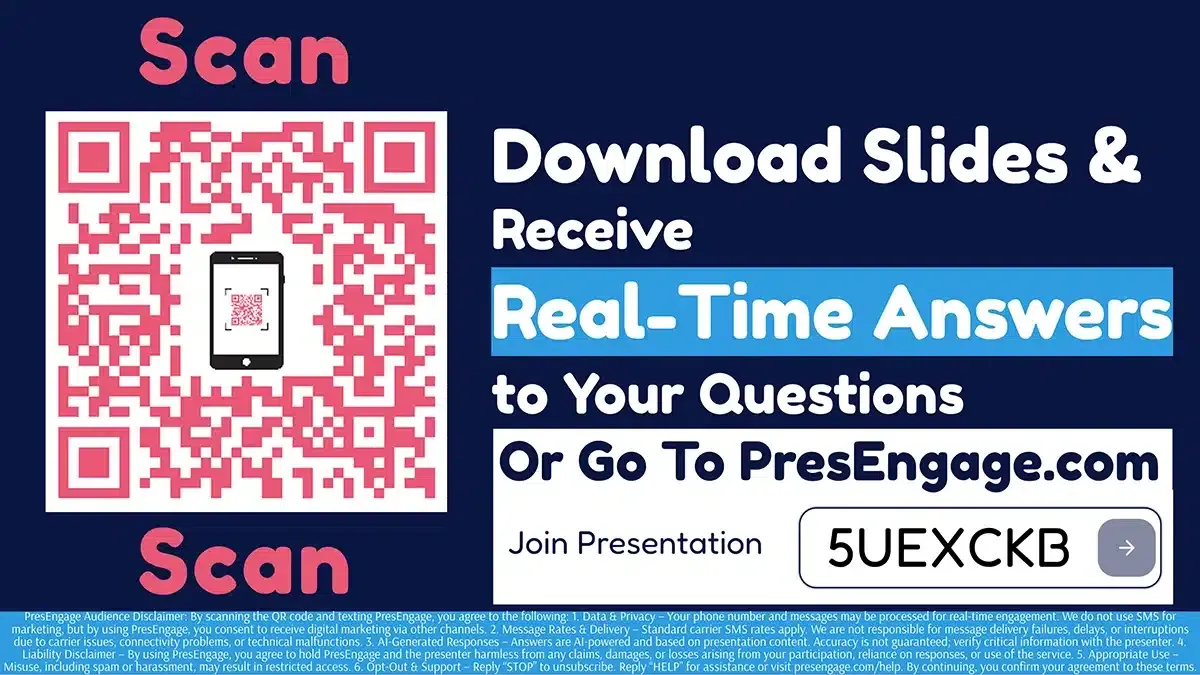
Share the Audience Connect slide to start engagement.

Screen share the QR code directly in Google Meet.
PresEngage is available on the Google Workspace Marketplace — install it to run AI Q&A right in the Google Meet side-panel. Prefer zero installs? Share your screen with the QR code slide and attendees connect in their browser — no app or admin approval required.
Also Works With











Upgrade Your Google Meet Experience
Start your free 14-day trial. No credit card required.
No credit card · Free forever for up to 25 audience members · 14-day full-feature trial