
Skip to content

Real-time AI Q&A software

Real‑time Q&A from an AI co‑presenter that answers in your words.

Your audience asks questions from any browser. PresEngage answers instantly — grounded in your deck, notes, research, and links. No app to install, no waiting.

No credit card · Free forever for up to 25 audience members · 14-day full-feature trial

Live now · no signup

The phone above is a simulation — this one's live.

Ask this real PresEngage presentation anything and get an instant, AI-generated answer on your device. No app, no signup.

Try the live demoJoin code 5UEXCKB

How real-time Q&A works

  • Grounded in your material.

    Answers are grounded in the content you upload — slides, PDFs, notes, research, and webpages — and the AI is instructed to stay inside it rather than guess.

  • Every question becomes a contact.

    Each conversation carries the engagement data your audience shares — turning curiosity in the crowd into a named contact you can follow up with, synced to your CRM.

  • Answers in 100+ languages.

    Nearly 1 in 5 people don't speak English at home. PresEngage replies in each attendee's language automatically — no extra setup and no translators.

  • Works during — and long after.

    Questions keep coming after you have packed up. Your AI co-presenter keeps answering 24/7, keeping your message alive when buying decisions are actually made.

<2s

to a grounded, on-message answer

0

apps for your audience to install

100%

of conversations visible to you

How it works

Live in under a minute.

  1. Step 1

    Train your AI

    Upload your presentation, speaker notes, and supporting materials. Your AI Co-Presenter learns your content in under 60 seconds.

  2. Step 2

    Present your content

    Show your Audience Connect slide or open the meeting side-panel. Attendees scan the QR code or tap the link and ask their questions right in the browser.

  3. Step 3

    AI answers instantly

    Your Co-Presenter answers from your content, in any language, while you keep presenting.

Prefer to submit in detail? Try Advanced Submission.

Before you go live

Rehearse your talk before anyone else can ask.

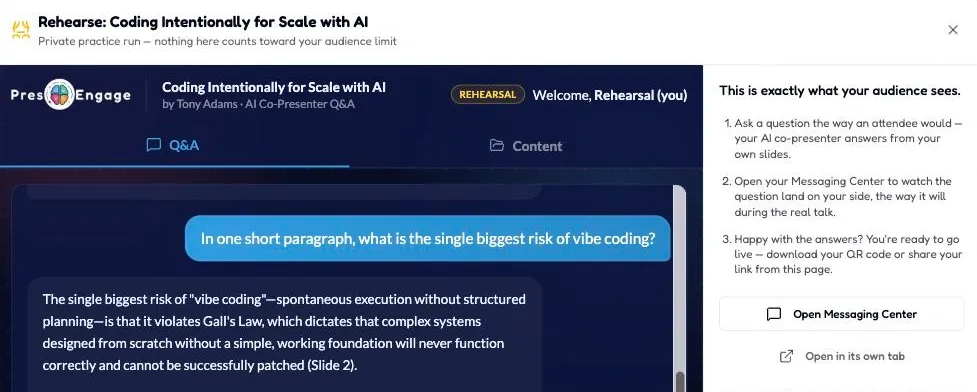
Open the Rehearse dialog on your own deck and ask your AI Co-Presenter the questions your audience will. Same answers, same slide citations, same screen they’ll see — so you find the gaps while there’s still time to fix them.

The PresEngage Rehearse dialog: a presenter asks their own deck a question and the AI Co-Presenter answers with a slide citation, flagged REHEARSAL
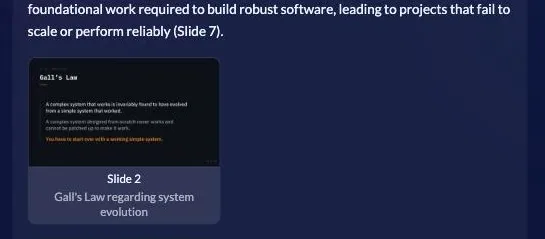
An AI Co-Presenter answer citing Slide 2 on Gall's Law, shown as a slide-reference card with a thumbnail of the slide
Every answer cites the slide it came from — the same card your audience gets.

This is exactly what your audience sees.

  1. Ask a question the way an attendee would — your AI co-presenter answers from your own slides.

  2. Open your Messaging Center to watch the question land on your side, the way it will during the real talk.

  3. Happy with the answers? You're ready to go live — download your QR code or share your link from this page.

REHEARSALPrivate practice run — nothing here counts toward your audience limit

Rehearsal questions appear in your Messaging Center as “Rehearsal (you)” and are excluded from your audience analytics and free-tier count.

If you can share a join link for a deck, you can rehearse it.

No credit card · Free forever for up to 25 audience members · 14-day full-feature trial

AI Co-Presenter: the AI that answers your audience from your slides

An AI co-presenter is an AI assistant that answers your audience's questions live during a presentation, drawing its answers from your own slides and documents. Instead of you fielding every question in real time — or losing questions you can't get to — the AI responds instantly, in plain language, in over 100 languages, grounded in the content you uploaded. PresEngage pioneered this category with its patent-pending AI Co-Presenter.

This is different from the AI in most presentation tools, which only generates slides or quiz questions before your talk. An AI co-presenter works during your talk, and it answers your audience.

How an AI co-presenter works

  1. You upload your content. Slides, a PDF, a script, supporting documents — whatever the AI should know. PresEngage processes it into a knowledge base for the session.

  2. Your audience joins app-free. Attendees open a web link or scan a QR code. No download, no account.

  3. They ask questions in their own words. During (or after) your talk, anyone can ask anything — typed naturally, in their own language.

  4. The AI answers instantly from your content. Responses are grounded in your uploaded material, not the open internet, so they stay on-message — and they're delivered in 100+ languages automatically.

  5. You stay in control. You see every question and answer, and anything your material doesn't cover is handed to you to answer yourself. The AI handles volume and the long tail; you handle the moments that matter.

Why it changes presenting

The hardest part of presenting live isn't the slides — it's the Q&A. Three problems an AI co-presenter solves:

  • Your material answers what you didn’t rehearse. Questions get an instant answer grounded in your own material, even the ones you didn't prepare for, and anything it can't cover is flagged for you.

  • No question gets lost. In a normal Q&A you answer five questions and lose fifty. An AI co-presenter answers them in parallel and hands you the ones your material doesn't cover, flagged in your Messaging Center so you can reply.

  • Language stops being a barrier. Attendees ask in their language and get answered in their language — 100+ supported — which is transformative for global webinars and multilingual events. See how it works for multilingual and global audiences.

AI co-presenter vs. "AI presentation tools"

Most tools that advertise "AI" do one of these — none of which is an AI co-presenter:

What the AI doesExample categoryWhen it works
Generates slides from a promptAI slide makersBefore your talk
Generates quiz/poll questions from a topic or docMost engagement toolsBefore your talk
Summarizes responses afterSome polling toolsAfter your talk
Answers your audience live from your contentAI co-presenter (PresEngage)During your talk

Generating questions and answering questions are fundamentally different jobs. Only the last one helps you when the room is live and the hands go up.

Where you'd use one

  • Conference talks and keynotes — handle a large room's questions without a mic runner or a clock.
  • Webinars — answer every attendee, not just the loudest five.
  • Sales and investor presentations — give prospects instant answers and capture them as leads at the same time.
  • Training and onboarding — let learners ask anything and get grounded answers from the course material.
  • Town halls and all-hands — pair live Q&A with AI answers so leadership isn't the bottleneck.

PresEngage's AI Co-Presenter

PresEngage built the first patent-pending AI Co-Presenter. It answers your audience live from your uploaded slides and documents, in 100+ languages, while your audience joins app-free by web link or QR code. It also captures attendees as leads and automates follow-up — so the same questions that get answered also build your pipeline. There's a free plan, and paid plans start at $29/month.

Explore the cluster

FAQ

Frequently asked questions

  • What is an AI co-presenter?

    An AI co-presenter is an AI assistant that answers your audience's questions live during a presentation, using your own slides and documents as its source. PresEngage pioneered the category.

  • How is it different from AI presentation tools like an AI slide maker?

    AI slide makers and most "AI" engagement features generate content before your talk. An AI co-presenter works during your talk and answers your audience in real time from your content.

  • What languages does it support?

    PresEngage's AI Co-Presenter answers in over 100 languages — attendees can ask in their language and be answered in it.

  • Does the AI make things up?

    It answers from the content you upload, not the open web, which keeps responses on-message and grounded in your material; a question your content doesn't cover is handed to you instead. Every question and answer shows in your Messaging Center, and you can reply to anyone yourself.

  • Can I test the AI before my audience sees it?

    Yes. Open “Rehearse your talk” on your own deck and ask your AI Co-Presenter the questions your audience will — a private practice run where nothing counts toward your audience limit. Rehearsal questions appear in your Messaging Center as “Rehearsal (you)” and are excluded from your audience analytics and free-tier count. If you can share a join link for a deck, you can rehearse it.

  • Do attendees need an app?

    No. They join from any browser — by direct web link, or by scanning a QR code in an in-person room. Text-message Q&A is a separate pay-per-use add-on available with Present In-Person and Present Everywhere.

Let AI handle the Q&A while you present.

Your AI co-presenter sees every question and never interrupts your flow.

No credit card · Free forever for up to 25 audience members · 14-day full-feature trial