
Event engagement platform
Maximum Audience Participation at Every Event
Maximize event ROI with browser-based Q&A that works for hybrid, in-person, and virtual events. Attendees scan a QR code or tap a link to join from any phone -- track engagement metrics, generate qualified leads, and engage audiences at scale, no venue WiFi required.

- 24/7
AI answers between sessions
- 0
Apps to download
- 100+
Languages supported
- 89
Leads in one 50-minute talk
Common Events & Conferences Presentation Challenges
- The problemLow Audience ParticipationPresEngage solves itBrowser-based Q&A reaches every attendee. Private questions from any phone remove the intimidation of conference microphones.
- The problemWiFi Failures at VenuesPresEngage solves itAttendees join from any browser on cellular data -- no venue WiFi needed. For rooms with no connectivity at all, an optional SMS add-on keeps in-person audiences engaged.
- The problemNo Post-Event MetricsPresEngage solves itComprehensive engagement analytics across all sessions. Track participation, trending topics, and speaker performance.
Engagement That Scales with Your Event
Whether you're organizing a 50-person workshop or a 5,000-person conference, PresEngage® scales effortlessly. Every speaker gets their own AI Co-Presenter, every attendee joins from any browser, and, by default, every interaction is captured.
- Browser-based engagement runs on cellular data -- no venue WiFi required, critical for large conference halls
- Each speaker gets their own AI Co-Presenter trained on their content
- Attendees ask privately, without conference microphones
- Works for hybrid events -- in-person and virtual attendees engage the same way
- Capture leads from every session and download them as a participant CSV for your CRM; Zapier covers incoming texts and WhatsApp with the optional add-on
- Optional SMS add-on keeps in-person rooms engaged even with no connectivity at all
- Post-event analytics show which sessions drove the most engagement
See It In Action
Run interactive sessions across in-person, hybrid, and virtual events -- on every conferencing and presentation platform your speakers bring.





What is an event engagement platform?
An event engagement platform lets attendees take part in sessions from their own phones: asking questions, getting answers and sharing their details with the speaker, without an app or a passed microphone. You may also see it called an audience engagement platform or a conference engagement platform. PresEngage® does it through Q&A. Attendees scan a QR code or tap a link, ask in their own language, and an AI Co-Presenter answers from the speaker's own slides and documents.
What to look for
- One-step joining. A QR code or link, no app and no account to create. Every extra step costs you attendees.
- A join that survives a packed room. Browser-based Q&A can run on attendees' mobile data, so it does not depend on the venue Wi-Fi.
- A way to handle volume. A popular session produces more questions than anyone can answer aloud. PresEngage's AI Co-Presenter answers what the speaker's material covers and flags the rest for the presenter.
- Knowing who asked. By default, attendees who join give a name and email, and you download them as a CSV.
- Something to review afterwards. Every question and answer stays in the Messaging Center, and Audience Intelligence shows each talk's audience, link opens and questions asked.
- Pricing that fits a program. PresEngage is priced per presenter account, not per attendee, apart from the optional SMS + WhatsApp add-on, which is billed per connected member.
Post-Event Analytics Across Every Session
Track engagement across all your conference sessions in one dashboard. See which speakers drove the most audience interaction, which topics trended, and download a CSV lead list for sponsors.
Have a recording of a session? Upload it to YouTube, Vimeo, Wistia or Cloudflare Stream first, then add its link to a presentation you've uploaded and attendees can watch it on your Q&A page while they ask. The AI answers from your slides and documents, not from the video. See presentation video.
- Engagement metrics per session, speaker, and topic
- Lead lists you can download as a CSV
- Browser-based on cellular data -- no venue WiFi dependency
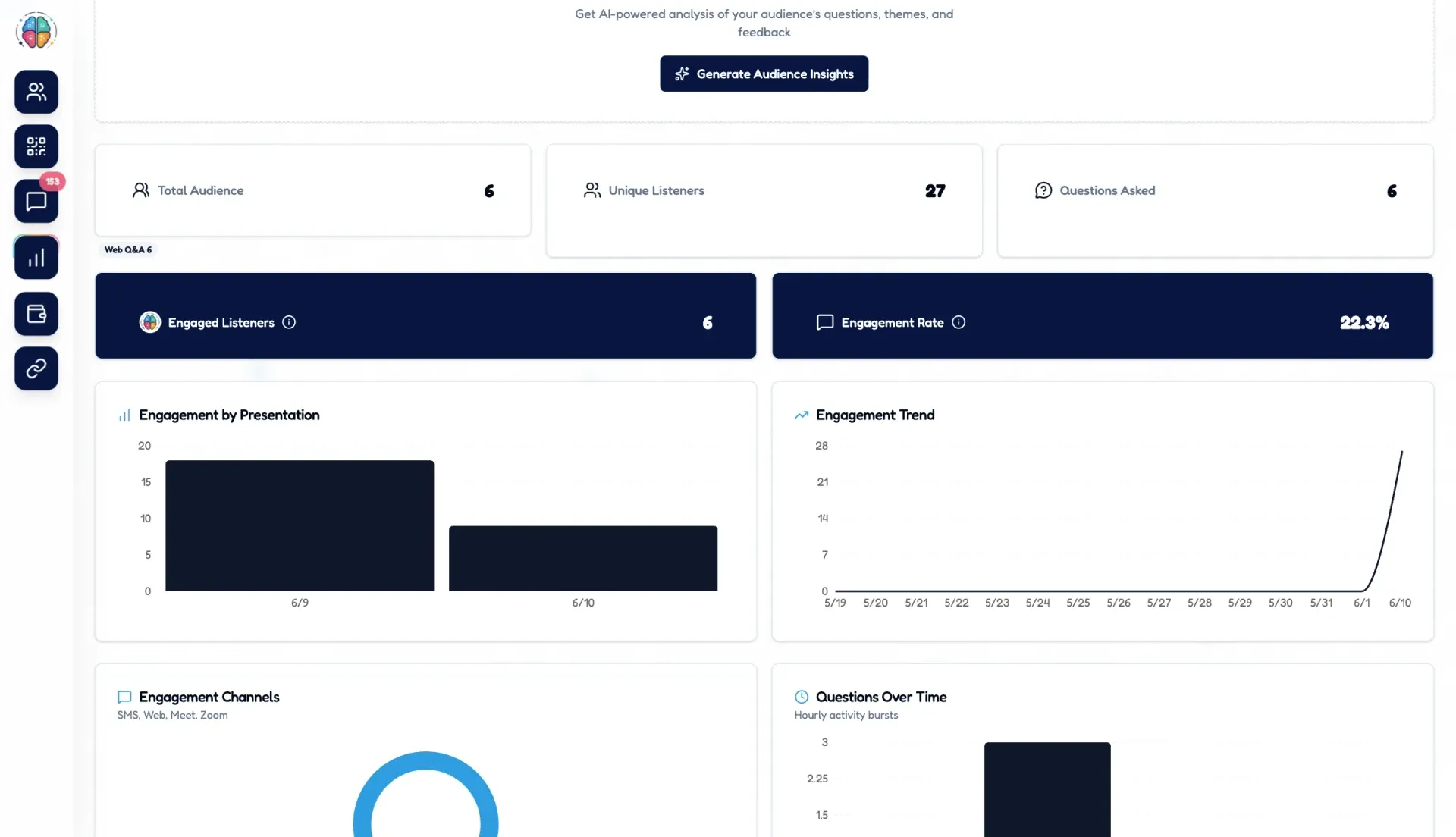
What one talk looked like: 89 leads
At Boulder Startup Week, 89 people connected to Ryan Shuken's 50-minute talk, 1.78 a minute. They connected and shared their details, and he walked off stage with the list. One documented talk, not a benchmark: your numbers will depend on your room and on what you offer.
Read the full story in the 89 leads in 50 minutes case study. For a conference, the same mechanic runs in every room at once: each speaker offers something worth connecting for, and each gets their own list.
How event Q&A options compare
Most events run Q&A one of two ways: a roving microphone, or a tool that collects questions from phones. The middle column describes the category in general and varies by vendor. For dated, vendor-by-vendor figures, read our comparisons with Slido, Pigeonhole Live, Vevox and Poll Everywhere.
| Option | Roving mics | Question-collection tools | PresEngage |
|---|---|---|---|
| Join friction | Walk to a microphone and speak in front of the room | Usually a code or link shown on a slide | Scan a QR code or tap a link; any phone browser, nothing to install |
| How volume is handled | One person at a time, so most questions go unasked when time runs out | A queue; features for sorting or approving questions vary by tool | Everyone asks at once; the AI Co-Presenter answers what the speaker's material covers and flags the rest for the presenter in the Messaging Center |
| Languages | The language the room shares | Varies by tool | Attendees ask in their own language; the AI answers in 100+ languages |
| Lead capture | None | Varies by tool and plan | By default a name and email for each registered attendee, as a CSV download for your own CRM import |
| Post-event analytics | Notes, if someone took them | Varies by tool and plan | Every question and answer stays in the Messaging Center; Audience Intelligence shows audience, link opens and questions asked |
| Price | Hardware and staff time | Often a free tier with a participant cap, then monthly, annual or per-event fees | First talk free at any size, then 25 audience connections in total; paid plans from $29 a month with unlimited audience size |
When another tool fits better
PresEngage is built around AI answers and Audience Intelligence for each talk. Choose something else if you need:
- Upvoting or an approval step. Many question-collection tools offer them; the dated comparisons above show which. PresEngage's web Q&A page has neither: the AI replies at once, and you see every question and reply in the Messaging Center.
- Quizzes, word clouds or surveys. PresEngage does not offer them. Its live polls are multiple-choice or open-text questions the presenter sends one at a time.
- A full event app. Agenda, networking and ticketing are not part of PresEngage. It covers Q&A, lead capture and follow-up for each talk.
- Team seats. PresEngage is one account per presenter, so an organizer running 18 rooms needs a presenter account for each speaker.
Running Q&A across a whole program
- The microphone is a single-threaded queue. Only one person can hold it. In a 300-seat ballroom most questions cannot be asked before time runs out, and the same few confident voices take the slots. A phone in every hand removes that ceiling, and a private question from a seat removes the cost of speaking up in public.
- Use one standard join slide in every room. Use the same join-slide layout in every room: the QR code and short link in the same place, with the same one-line instruction, so attendees learn the motion once on day one and stop thinking about it. Each speaker's own QR code and link go on that speaker's slide.
- Treat the questions as your content plan. A question nobody got to answer live is a follow-up email, a blog post or next year's session topic. They stay in each speaker's Messaging Center after the event, and Audience Intelligence shows what was asked and how often.
Event engagement platform questions
What is an event engagement platform?
An event engagement platform lets attendees take part in sessions from their own phones: asking questions, getting answers and sharing their details with the speaker, without an app or a passed microphone. PresEngage does this through Q&A. Attendees scan a QR code or tap a link, ask in their own language, and an AI Co-Presenter answers from the speaker's own slides and documents.
Do attendees need an app or the venue Wi-Fi?
No app. Attendees scan a QR code or tap a link and ask in their phone's browser. Web Q&A needs an internet connection, but attendees can use their own phone's mobile data instead of the venue Wi-Fi. For rooms where the connection is unreliable, an optional paid SMS + WhatsApp add-on is available with Present In-Person and Present Everywhere.
Does it work for hybrid events?
Yes. In-person attendees scan the QR code and online attendees open the same link in their browser, so both groups ask the same way. On Zoom and Google Meet, people on a computer can also ask from a side panel, with plans that include the online channel.
How does it work across a multi-session conference?
Each speaker gets their own presentation, join link and QR code, and an AI Co-Presenter that answers from that speaker's own material. Use the same join-slide layout in every room, with the QR code and link in the same place, so attendees learn it once. PresEngage is one account per presenter, so a program with many speakers needs a presenter account for each speaker.
Can it capture leads at an event?
Yes, by default. People who join on the web Q&A page give a name and email (or continue with Google), so the speaker sees who asked what in the Messaging Center. Download participants saves them as a CSV you can open in Excel or Google Sheets or import into a CRM. You import the file into your CRM yourself: there is no native Salesforce or HubSpot integration. Someone who never registers is not captured.
What does it cost?
Your first talk is free at any size. After that, the free plan allows 25 audience connections in total. Paid plans start at $29 a month with unlimited audience size. They are priced per presenter account rather than per attendee, apart from the optional SMS + WhatsApp add-on, which is billed per connected member.
Don't take our word for it — be the audience.
This is a real PresEngage presentation, trained on PresEngage itself. Ask it anything and get a live, AI-generated answer on your device — no signup.
As seen on

89 leads captured in one 50-minute talk at Boulder Startup Week.
Read the case studyMake Your Next Event Truly Interactive
Give every attendee a voice and every speaker an AI Co-Presenter.
No credit card · Free forever for up to 25 audience members · 14-day full-feature trial