
Interactive Prezi presentations
Make your Prezi interactive — with live AI Q&A
Prezi's zooming canvas grabs attention — now make it two-way. Add a live AI Co-Presenter to any Prezi in the browser — it answers your audience from your own deck and notes, so your audience interacts with your story instead of just watching it.
No credit card · Free forever for up to 25 audience members · 14-day full-feature trial
What You Get
Prezi + PresEngage
Prezi's zooming canvas captures attention visually. PresEngage captures audience questions and engagement in the browser. Together, they're unstoppable.
AI Answers from Your Content
Your AI Co-Presenter learns your Prezi content and answers audience questions grounded in it. No interruptions, no delays.
Match Prezi's Innovation
Prezi users choose it for its innovative approach. PresEngage matches that innovation with browser-based, AI-powered engagement.
The Browser Works Everywhere
No matter how dynamic your Prezi is, audiences engage from any browser -- a quick scan or tap. Universal access, zero friction.
Simple Setup, Powerful Results
- 1
Export Your Prezi
Download your Prezi presentation as a PDF. Include all paths and topics for comprehensive AI training.
- 2
Upload to PresEngage
Upload your Prezi PDF to PresEngage. Your AI Co-Presenter learns your non-linear content structure in seconds.
- 3
Present and Engage
Run your Prezi presentation while audiences ask questions in their browser. AI handles Q&A while you zoom through your canvas.
Innovation Meets Engagement
Prezi transformed how we think about presentations with its unique zooming canvas. PresEngage® transforms how audiences participate in those presentations. Together, you deliver the most innovative and interactive presentation experience possible -- visually captivating and interactively engaging.
Interactive Prezi Presentations with PresEngage
Pair Prezi's zooming canvas with an Audience Connect slide and watch participation climb. Viewers scan, ask their questions in the browser, and get instant AI answers while you keep moving through your dynamic Prezi story.
See It In Action
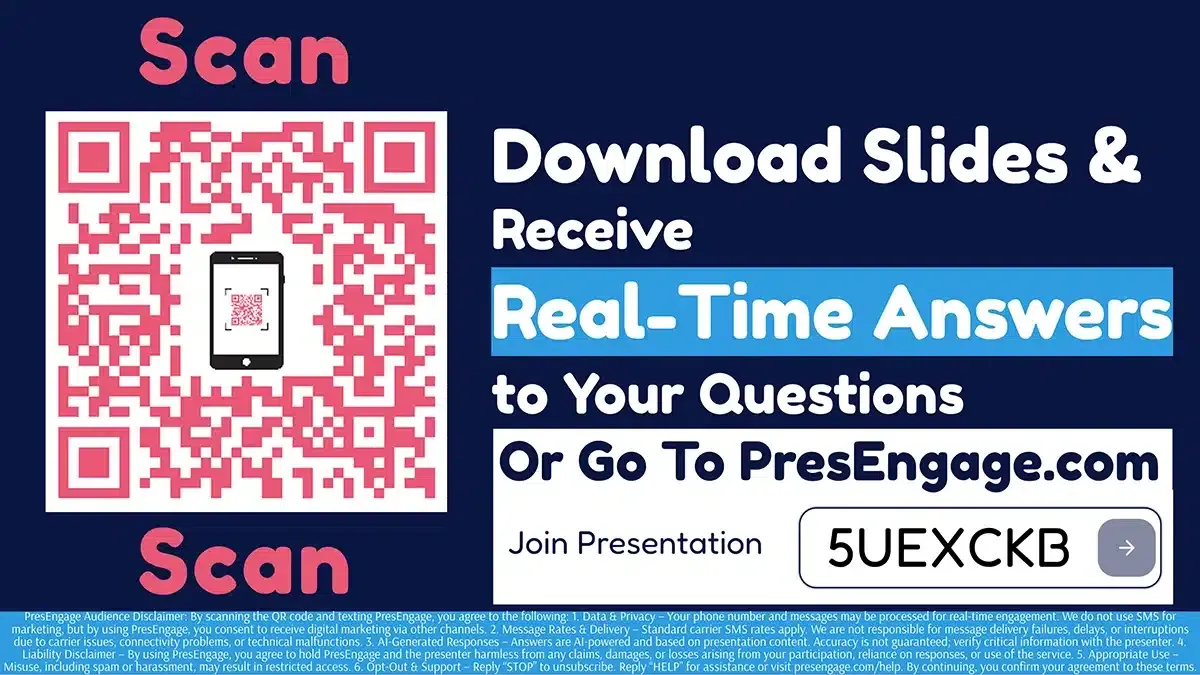
Audience Connect Slide
Works With Your Stack












Make Your Prezi Presentations Interactive
Add AI-powered browser-based engagement to your dynamic Prezi presentations.
No credit card · Free forever for up to 25 audience members · 14-day full-feature trial